How to organise a website project, step by step
Most delays on a website project don't come from the technical side, but from content that never arrives and feedback scattered everywhere. Here is how to avoid them.
A website, even a small one, is a project with several stages and several people: you (or your team), the client, sometimes a photographer, a copywriter or a developer. Most delays don't come from the technical side. They come from content that never arrives, feedback scattered across emails and small oversights discovered the day before launch.
Here is a simple way to organise this kind of project, whether you build showcase websites for clients or you're redoing your own company's site.
The seven stages of a website project
Almost every website project goes through the same stages, in this order:
- Scoping: goals, target audience, list of pages, timeline, approved quote.
- Content: copy, photos, logo, legal information.
- Mockup: the look of the main pages, approved by the client.
- Build: actually building the pages.
- Testing: the checks before going live.
- Launch: domain name, hosting, redirects.
- Follow-up: fixes, analytics, updates.
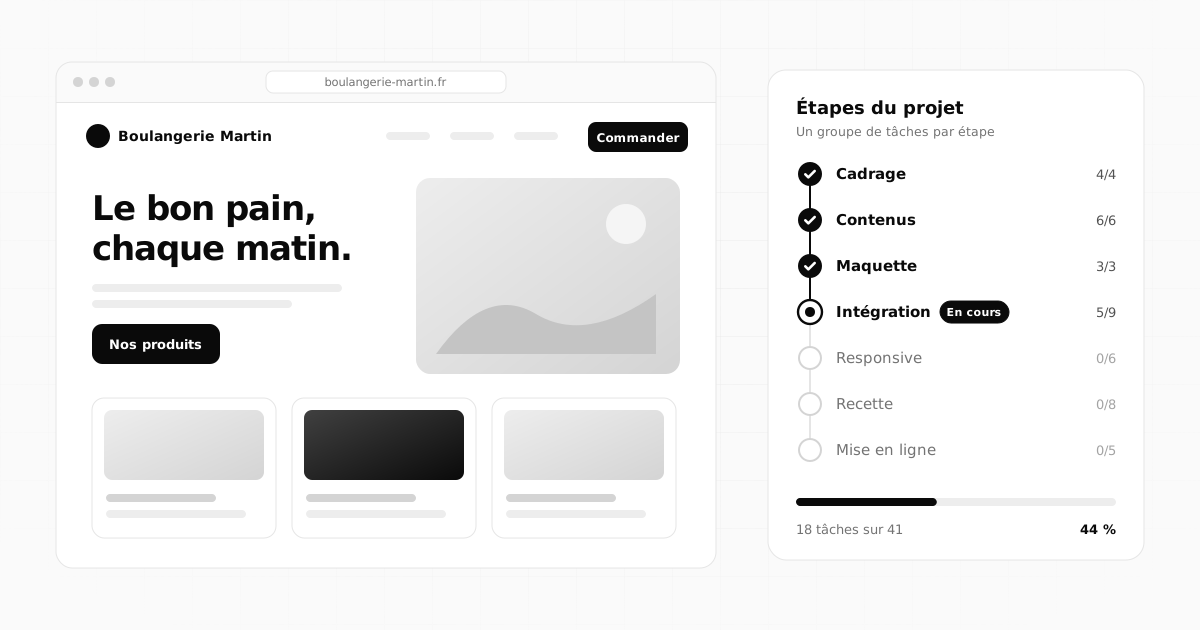
In your project tool, each stage can become a task group. In Flopilot, you create a group simply by giving it a name ("Scoping", "Content", "Responsive"...): tasks are filed under it and you can see at a glance which stage is moving and which one is stuck.
Stage 1: a written brief, even a short one
Before you design anything, write a one-page scoping note in the project. It answers five questions:
- What is the site for (being found, building trust, selling, recruiting)?
- Who is it for (your client's customers, not your client themselves)?
- Which pages (home, services, about, contact, legal notice)?
- When is it due, and why that date?
- Who approves, and who provides what?
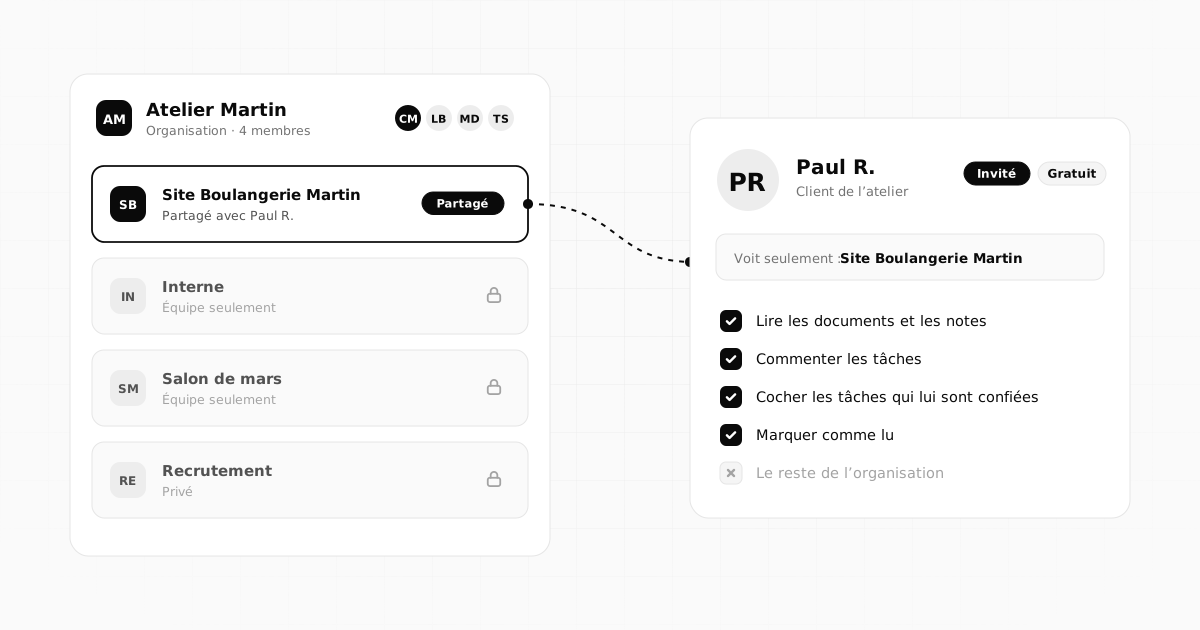
Keep the signed quote and the specification next to it, if there is one. If you want to be sure the client has actually read the brief, send it to "To read": you'll see when they've read it.
Stage 2: content, the real bottleneck
In most projects, content is what causes the delays. The client plans to send it "next week", then other emergencies come up. The answer isn't to chase more often: it's to make every request precise and dated.
Create one task per piece of content, with a due date and the person who needs to provide it:
- the logo in good quality (SVG or PNG file);
- the home page copy;
- the copy for each service;
- around ten photos (team, premises, past work);
- the details for the legal notice;
- access to the current domain name, if there is one.
Stage 3: the mockup and feedback
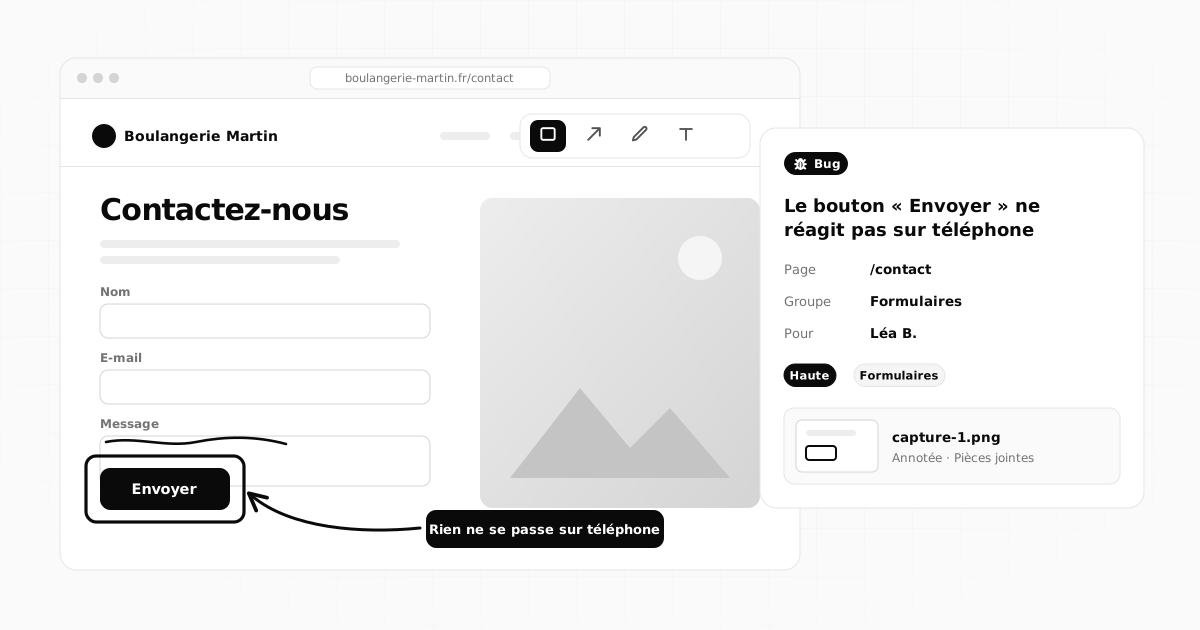
The mockup is when feedback floods in. To avoid an endless email thread, make sure each piece of feedback becomes one task: one thing to change, one screenshot, one sentence.
In Flopilot, the "Report / suggest" button does exactly that: you choose bug, change or idea, paste a screenshot with Ctrl+V, annotate it (box, arrow, pen, text) and the request lands in the project with the address of the page concerned. The full method is in Report a bug with an annotated screenshot.
Also set a simple rule from the start: two rounds of feedback on the mockup, each one grouped together. One comment a day for three weeks is a project that never ends.
Stage 4: building in small pieces
During the build, break the work into short tasks: one page, one component, one feature. "Make the website" isn't a task; "Build the Services page" is. The kanban board is very handy here, with columns such as to do, in progress, to review and done.
Keep everything you need close at hand in the project's useful links: the staging site address, the online mockup, the hosting dashboard, the brand guidelines.
Stage 5: testing, with a real checklist
Testing means checking everything methodically before going live. Without a written list, you always forget something. Here is a starting point to adapt:
- every page displays properly on phone, tablet and desktop;
- forms actually send their messages, and to the right address;
- all links work, none lead to an empty page;
- every page has a title and a description for search engines;
- images are lightweight and have alt text;
- the legal notice and privacy policy are in place;
- the site stays fast on a mobile connection.
A "Responsive" group and a "Forms" group in the project let you file fixes as you go.
Stage 6: a stress-free launch
Plan the launch for a Tuesday or Wednesday rather than a Friday evening: if something goes wrong, everyone is around to fix it. Your launch checklist usually includes the domain name connected, the security certificate active, old addresses redirected, analytics set up and the site submitted to search engines.
Stage 7: follow-up after launch
A website is never quite finished. Keep the project open for a few weeks for small fixes, then move later requests into a maintenance project. If the site is built with Flopix, you can connect Flopix to Flopilot and track the site's visits on your dashboard, right next to your tasks.
The mistakes that derail a website project
- Starting without a written brief: everyone pictures a different site.
- Waiting for content with no date: the project stalls without anyone deciding it should.
- Feedback over the phone: nothing is written down, everything gets discussed twice.
- Testing from memory: that's the broken contact form you discover three weeks later.
Frequently asked questions
How long does a showcase website project take?
It mostly depends on how quickly the content arrives. The technical side of a small showcase website is often the most predictable part; it's the copy, the photos and the approvals that stretch the timeline. That's why dated tasks for every expected piece of content make such a difference.
How do I avoid endless client feedback?
Set a number of feedback rounds from the start (two, for example), ask for each round to be grouped together, and turn every comment into a task with an annotated screenshot. Everything is written down, nothing gets lost, and everyone can see what has been done.
Can I import a ready-made task list into Flopilot?
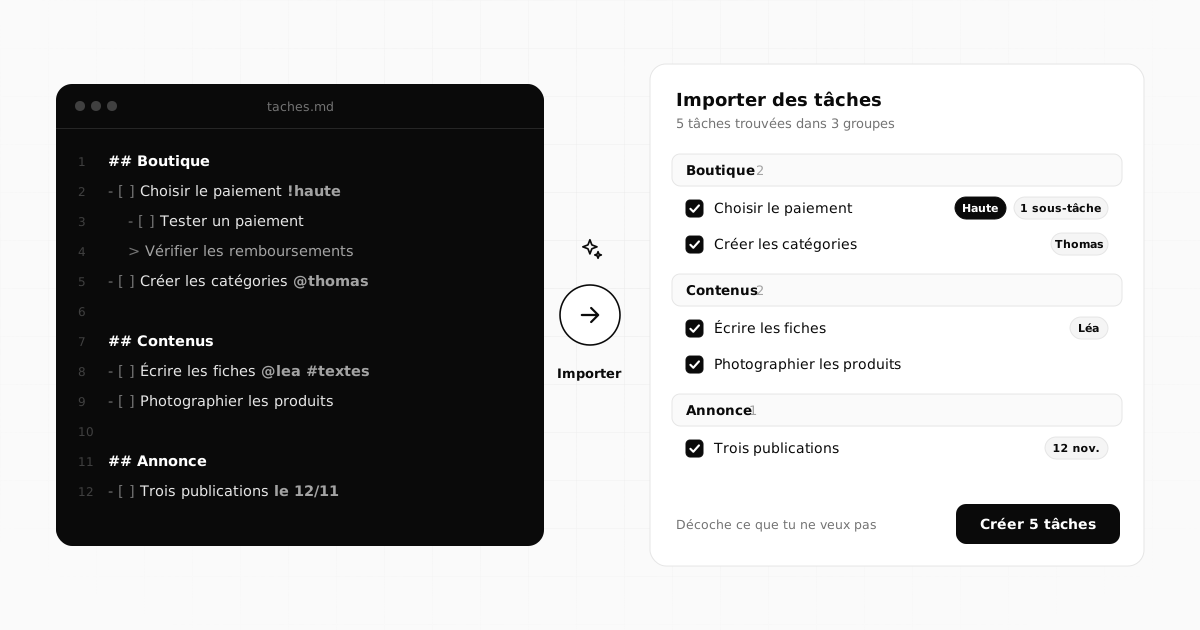
Yes. Paste Markdown text or drop a .md, .txt or .csv file: "##" headings become groups, "- [ ]" lines become tasks, and the French keywords the app understands (dates such as demain, priorities such as !haute, #tags, @people) are picked up. You can untick anything you don't want before the tasks are created.
All of this, in a single tool
Flopilot brings together tasks, list, kanban and calendar views, documents you can read right in the app, and a dashboard for every project.
WebsitesWeb agenciesProject management